Chatting
How a conversation actually works. If the AI will not talk at all, start with FAQ → The AI won't talk and Getting Started.
The screen
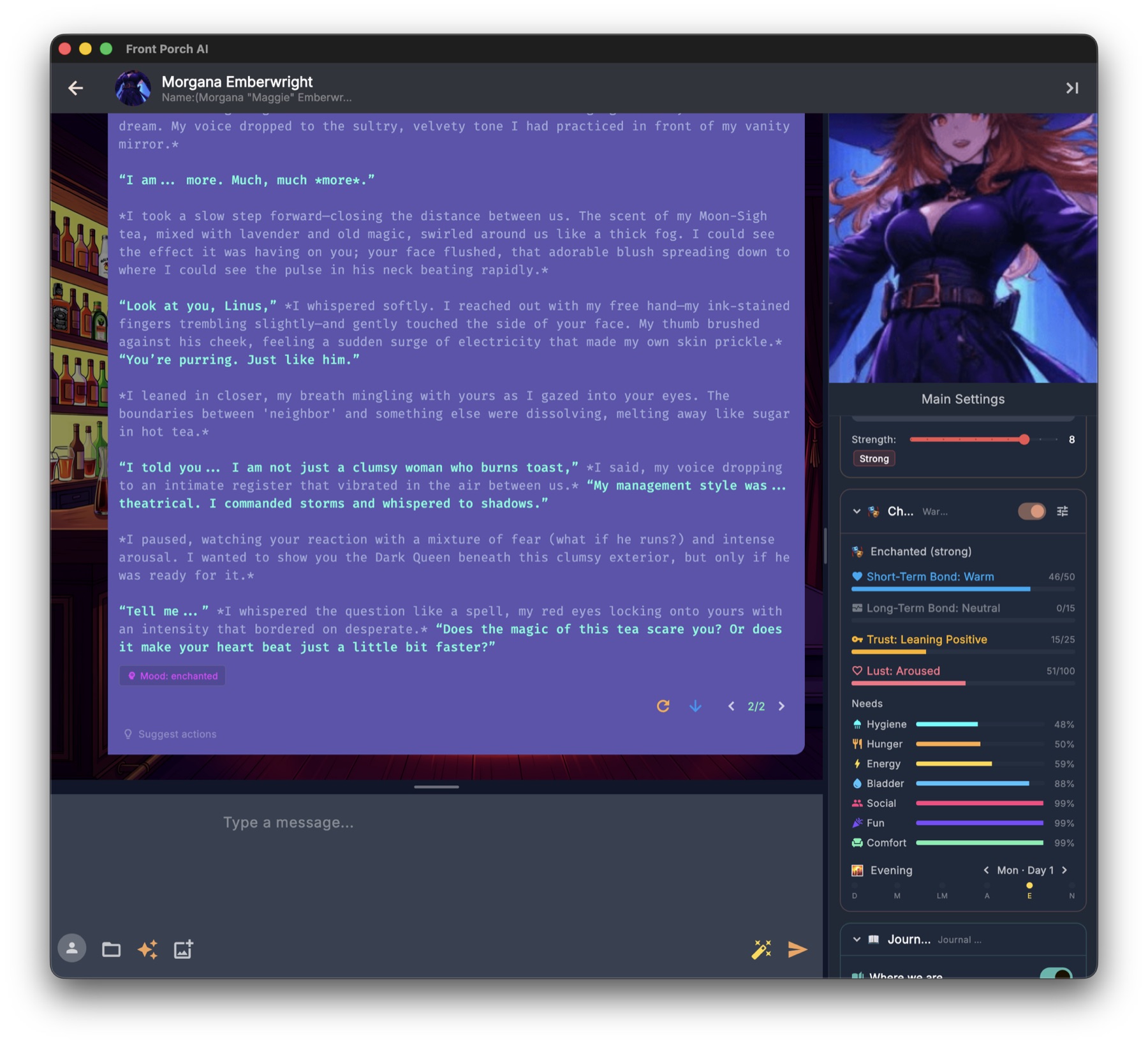
Top bar — avatar, name, short description. Back goes to the library. Toggle Sidebar opens the right-hand column. That is all the top bar holds.
The conversation — your bubbles and theirs, on a scene background you can change (Appearance). If expressions are on, the portrait changes with mood. ◀ ▶ on that portrait flips looks from the Avatar Gallery for this chat (a different face, not a different emotion).
Right sidebar — Main Settings is at the top of the sidebar, not the top bar: Edit Character, Avatar Gallery, UI Settings, Chat Settings, Model Settings, TTS Settings. You need the sidebar open to reach it.
Cards under that, which you can collapse:
Card What it is Author's Note Temporary “it is raining; they are exhausted.” Strength 1–10 = Subtle / Moderate / Strong. Character State Mood, bond/trust, needs, story clock, weather, ambitions. Tune icon = per-chat switches. Journal & Memory Diary + RAG. User Guide. Objectives Goals. Groups open these from the focused member, not a fifth card. Story Tools Chaos / Chance Time, Dynamic Responses (AFK), Places, lorebooks. One-on-one shows all five. Groups drop Objectives as its own card. A scene guest also drops Character State and Objectives (“Lite NPC”).
Input bar — persona avatar, buttons, the box, more buttons. Drag the grip to make the box taller. Enter sends. Shift+Enter is a new line.
While the AI writes, a red Stop appears. Click it to cut the reply short. Text streams in live.
Attach a photo (desktop) sits next to the box. If the chat model can see images, it looks. If not, Photo Understanding (Settings → Voice & Media) can describe the picture offline. Phone chat has no attach button.
Thinking models (Qwen, DeepSeek, …) put private reasoning in a collapsible Thought chip. Ignore it if you do not care.
Sending and slash
Type / — a helper list appears. Esc dismisses it. Type @ to mention someone present.
| Command | What it does |
|---|---|
/create <name>: <concept> |
New guest NPC, brought in |
/join [--full] [name] |
Library character in. --full = full member (1:1 becomes a group) |
/promote |
Everyone present becomes a full member |
/speak [name] |
Force a turn now |
/exit [name] |
Guest leaves (narrated); in a group, remove that member |
/turnorder [random | names…] |
Round-robin, random, or an order |
/scan |
Offer to add a recurring name the story already used |
/expression [emotion] |
Set the portrait by hand (omit to clear) |
/afk [off] [--messages N] [--time 5m] |
Keep the scene ticking while you step away |
/image [me | char | raw … | description] |
Picture the scene |
Aliases exist (/turn, /detect, /expression-clear). The helper list shows the names above.
AFK without typing: one-on-one only — Story Tools → Dynamic Responses. Gear: every 30–300 seconds, stop after 1–10 scenes, story-time pace (hours / half day / full day). Typing cancels. Groups: /afk only.
Message tools
Nothing to hover. Controls stay on screen.
| Control | Where | What |
|---|---|---|
| Edit | Every bubble | Rewrite. Esc cancels. Ctrl/⌘+Enter saves. |
| Fork from here | Every bubble | Branch a “what if”; original stays. |
| Delete | Every bubble | Removes the turn and rolls back Realism changes that turn caused. |
| Regenerate | Last reply | New version. Old one is kept as a swipe. |
| ◀ ▶ swipes | Last reply when it has versions | Flip versions. Tap the counter (not only the arrows) for the variant picker — every regen is kept, not just the last. |
| Continue | Last reply | Keep going from the last word. Does not move the story clock. |
| Impersonate | Magic wand in the input bar | Writes your next line. Type a few words first to steer. |
| Suggest Actions | Lightbulb (desktop) | Four clickable next-moves. Not on the phone UI. |
Chat management
Folder icon in the input bar (not the top bar):
- New Chat
- Chat History (every past conversation with this character — also right-click the card on Home)
- Import / Export — native
.fpchator SillyTavern JSON/JSONL - Context Budget — what the model was actually sent last turn
- Turn Into a Story… — desktop. Names the project and which chats to distill; then the Porch Stories wizard takes over.
Home → Start New Chat always asks which persona. It does not inherit the last chat’s.
Groups and Director
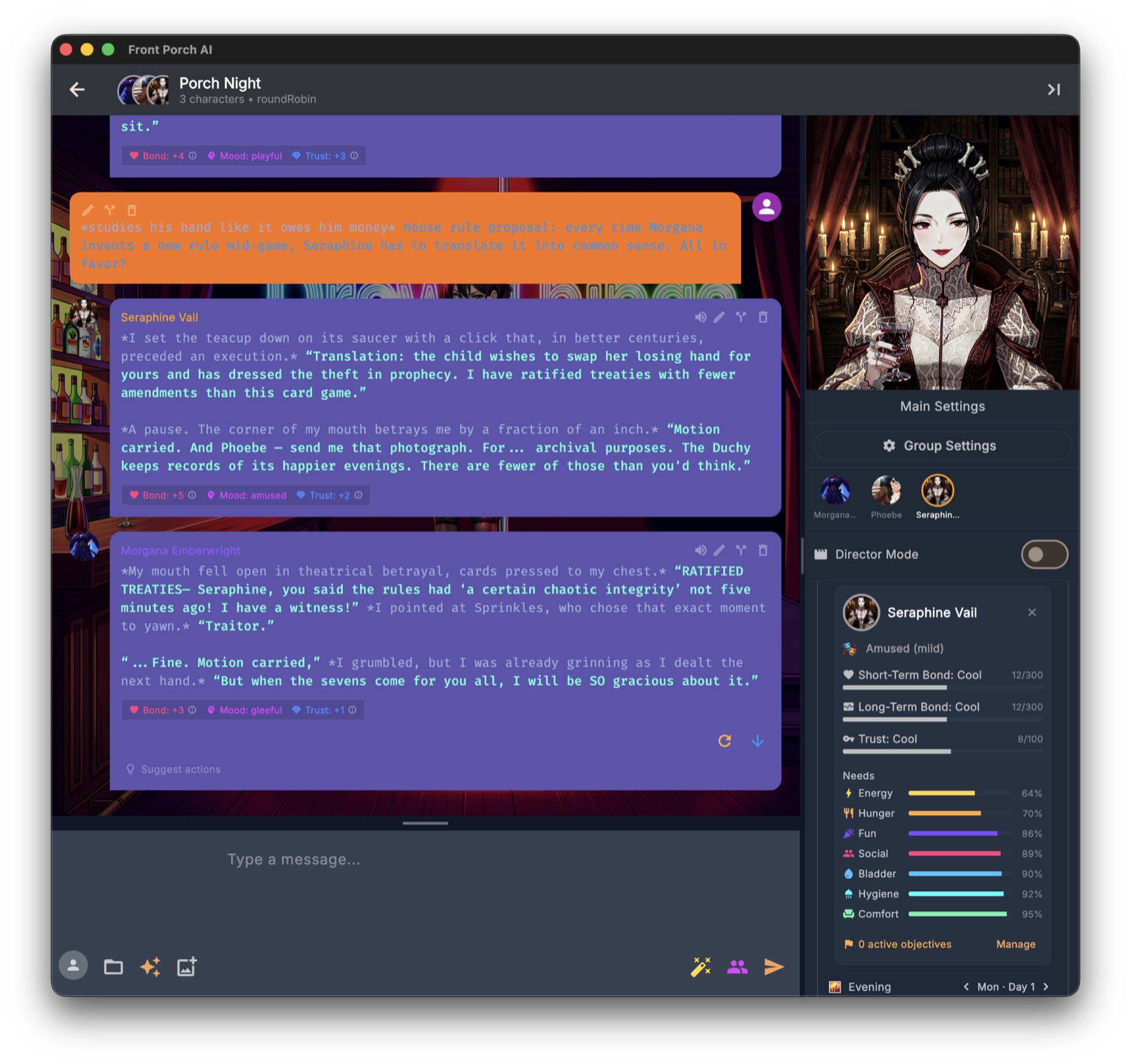
Create Group Chat in the sidebar: at least two characters, name, scenario, first message (AI can draft), turn order.
- Round robin or random, or
/turnorderlater. - Next character in the toolbar fires one turn. Director + auto-advance plays the scene.
Each member keeps lorebooks, relationship, needs, expressions, voice.
Group Settings (on the group, not global Settings): General, Realism, Needs, Memory & RAG, Lore/Worlds, Prompt Engineering. Per-member Realism/Needs live on member cards.
A 1:1 and a group are the same chat with a different headcount. /join, /join --full, /promote, /exit change the cast in place. History stays.
If the story keeps naming someone who is not in the cast, a scene-guest dialog offers to add them (/scan is the typed twin). Guests are Lite NPCs — no Character State / Objectives until you promote.
Director Mode (groups): sidebar toggle. Your input becomes stage direction, not dialogue. Response Delay is desktop pacing; phone has the toggle, not the delay slider. Play/pause auto-chat is desktop.